
Monday, 05 June 2017
Fatima Diaz eFront FrontScript
So far we have only seen tables created in the WORK space. For reports this space is useful because the programs are executed in real time and we will only create the tables at runtime, so that we avoid overloading the memory. But what if we need to access those tables before we can run the programs? How can we create permanent tables in eFront?
Although we have worked in a temporary space with reduced access to the runtime, eFront offers us a series of directories and workspaces that we can use to create permanent tables.
To be able to create a table in any directory, or read a table if it already exists in that folder, we will use the LIBNAME command, which is accompanied by an alias for the directory and the directory:

In the example, we have called the current directory of the program (CURRENT) with the alias TABLE so that our EXAMPLE table is saved in eFront permanently.

In the folder where the program is located, our table will appear, which can also be read from other programs and from the reports.
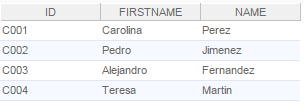
To reference a directory that is not CURRENT we will only have to write the address of the folder where we will save the table in quotes. For example:

If we want to access them from, for example, the panels we must use the workspaces that eFront proposes to create information cubes. In addition to the WORK space, we have three other spaces that will be of great help:
- Session: that keeps the tables all the time we are connected. It is a space that can only be accessed by the user who is using it, that is, if we create a table in SESSION, we can only see it. These types of cubes, along with temporary cubes in WORK, are not cached.
- Global: which creates tables accessible to all users of an account and also stores them in memory and cache. So if we close the session they will not be deleted and can be read even if the program that creates them is not executed.
- Universal: What differentiates this space from the GLOBAL space, is that the tables created here are accessible to all eFront accounts.
To reference these spaces will be done as we have seen in the previous examples with WORK (it is not necessary to use LIBNAME, since eFront already recognizes them automatically). For example:
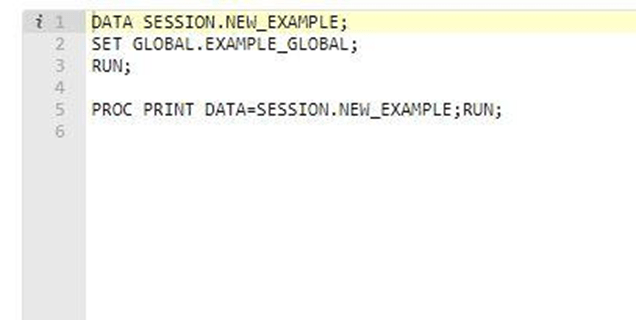
In this last program we have created a new table that we can read throughout our session and it is also a copy of the EXAMPLE_GLOBAL table that is an existing table.
