
Monday, 03 March 2020
autanabp
To configure the smtp email in joomla and be able to send emails through our website, we simply have to configure the following:
We enter the Joomla administration, select the Site menu option: Global Configuration and once inside click on the “Server” tab
In this tab, there are a series of parameters that must be configured according to the type of server (in our case smtp) that we are configuring.
The options: Server Configuration, Location Configuration, FTP Configuration: will be defined by the system automatically and do not need to be changed.
The option Configuration of the database, must be defined according to the type of database that we have defined in the installation of the joomla, in our case they will be:
Type: MySQL
Hosting: Localhost:3306
User: DB user name Database:
Database namePrefix:
From database tables
These options will normally come already defined and we probably do not have to change them either, in any case they will have to be reviewed.
Email Settings option
Email manager: SMTP
Site email: contact email (Address that will appear in emails sent from the web)
Sender: Name of the sender.
Sendmail path: (default) /usr/sbin/sendmail
SMTP authentication: Check “Yes”
SMTP Security: SSL
STMP Port: 465
Note: The port is related to the encryption method used, if ‘ssl’ is used port 465 must be used and if ‘tls’ is used we must use port 587
SMTP User: Account Email
SMTP Password: SMTP User Password
SMTP Hosting: Account SMTP Web Server
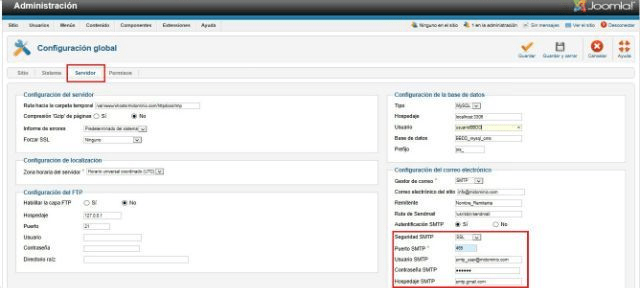
With this we will have configured our SMTP mail in joomla and we will be able to send messages according to the options / Contact modules that we have defined on our website.
