Thursday, 27 April 2020
autanabp
It may have happened to you on more than one occasion, that when creating a campaign, you do not have the status of the members visible, when you have already configured them previously in the Member status field, I explain why this has happened and what is the solution:
Salesforce does not allow you to define for all campaigns at once, the status of the members, but it has to be done individually in each campaign.
For each, marketers must define Member State values that a candidate, contact, or personal account has for a campaign. For example, you can set the values of “Planned”, “Invitation sent” and “Attended” for a conference, etc.
Not available in Lightning Experience.
As a solution, you can create a campaign that will be used as a single template and enter all the required member state values in this “template” type campaign and instead of creating a new campaign from scratch, we simply duplicate from this “template” and all the member state values will be copied, the guests are not copied and everything is modifiable at the same time it is duplicated.
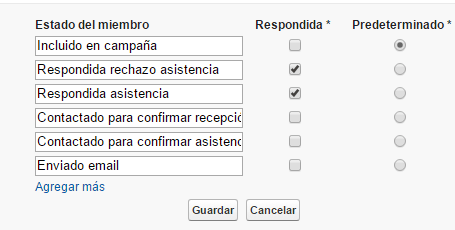
To add/configure Member Status
– Go to Advanced Settings within the “template” campaign-
Press the Modify button
– Enter the desired values and for each new value, click the link: Add more-
Mark the status that will be the Default.
– Mark which status(es) is considered as “Answered”